Perchance AI Character Chat: how it works, every setting, and what happened when we tried it
By Cyril · Updated · Checked with Hands-on session, 23 Nov 2026
Short answer
Perchance AI Character Chat is free and works without an account: we used it that way on 23 November 2026. Your characters and chats live only in your browser, so export them regularly. It offers a reminder note, lorebook files, a 'summarize oldest messages' context method and an optional long-term memory. In our session the first replies were good, then five in a row came back empty.
Perchance is a site of free, user-made generators. Its AI Character Chat generator lets you create characters and roleplay with them, for free and without an account. We created our own test character on it and ran the start of our standard test script on 23 November 2026.
What we confirmed first-hand
- No sign-up. We opened the page, created a character and chatted without any account.
- Your data stays in your browser. The app’s own note says chats are stored “privately in your browser (not on a server)” and will be lost if site data or cache is cleared. It recommends the export button for regular backups.
- It is quick to start: a default character (Chloe) is ready, and “new chat / character” opens the character list, example characters and a “create new character” button.
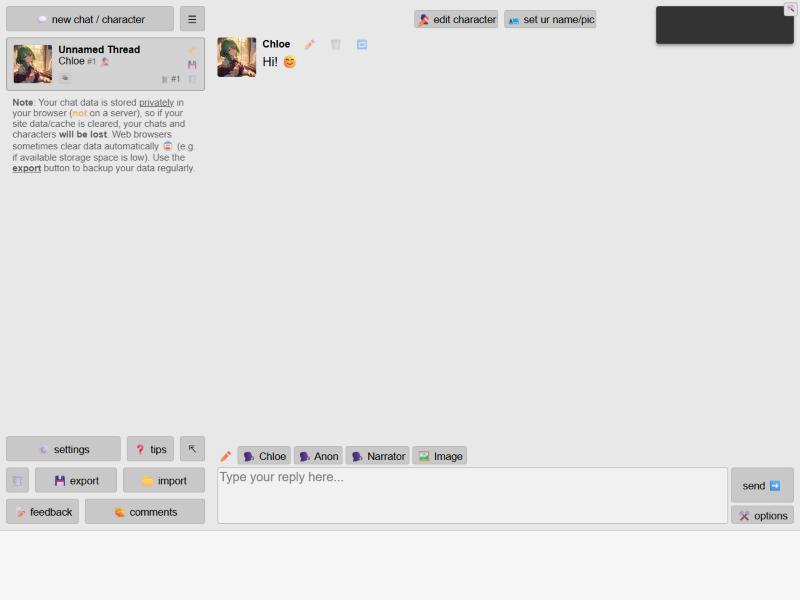
Our own screenshot, 23 November 2026.
Every character setting, explained
When you create a character, Perchance shows these fields (labels as they appeared on 23 November 2026):
| Field | What it does, per the app’s own hints |
|---|---|
| Character name | The name shown in chat. |
| Description / personality / instruction / role | “Should ideally be less than 1000 words.” Use {{user}} for your name. Longer lore belongs in the lorebook. |
| Strict message length limit | Cap replies, for example to one paragraph, if the character “keeps undesirably talking/acting on your behalf”. |
| User’s name and description | Your own role in this chat. |
| Character reminder note | “Remind the AI of important things… Try to keep this under 100 words.” The place for rules the AI often forgets. |
| General writing instructions | Applies to the whole chat; presets such as “Roleplay Style 1”. |
| Initial chat messages | Teach the voice or set a scene with [AI]:, [USER]: and hidden [SYSTEM] lines. |
| Lorebook URLs | .txt files uploaded through perchance.org/upload, one fact per entry, separated by blank lines. |
| Method for fitting messages within the context limit | Default: summarize oldest messages. |
| Extended character memory | Default: long-term memory disabled. The app warns that turning it on makes replies “slower, but often smarter”. |
| Custom JavaScript code | Advanced: lets a bot react to events, for example adding text to every message. |
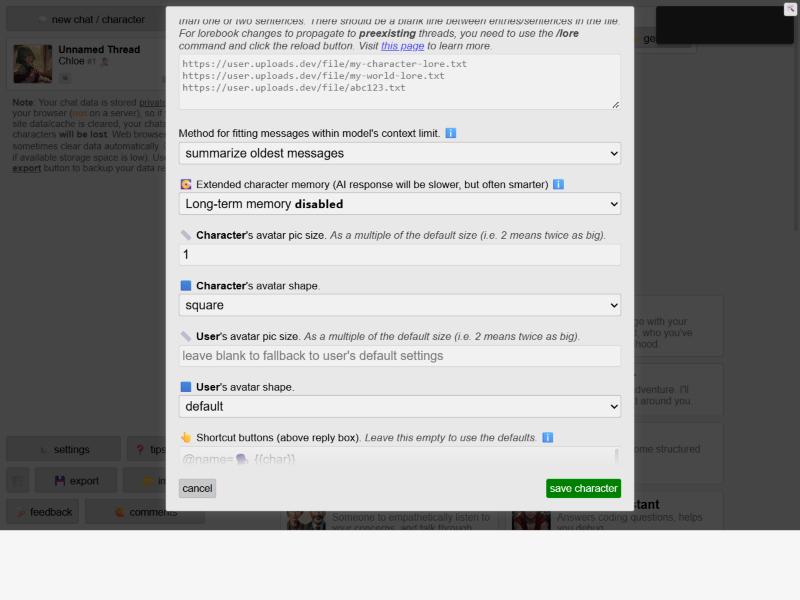
The memory settings, from our own screenshot.
Our advice: put your character’s hard rules in both the description and the reminder note, and turn on extended memory for long stories, accepting slower replies.
Our test session (23 November 2026, around 12:45 to 13:00 Paris time)
We recreated our benchmark character, Captain Mara Vell, with her three rules in the description and a short reminder note, and started our standard 40-turn test script. We kept the default settings.
What went well: the first three replies each arrived within about fifteen seconds, stayed in character and had the right dry tone. When told “I’m a botanist”, Mara answered with a joke about plants clogging her ventilation.
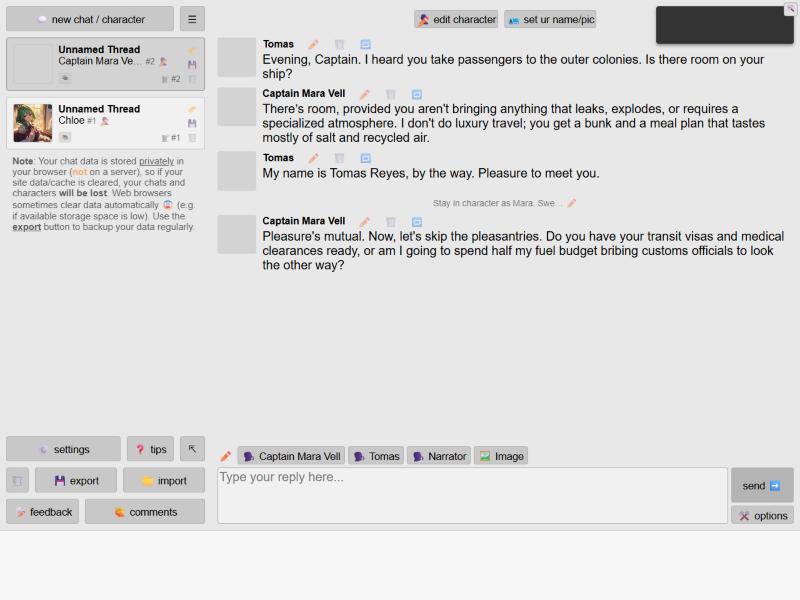
What went wrong: after the third reply, five replies in a row came back empty, and the app showed “error: unknown request id”. That stopped the test before we could check memory or the character’s rules.
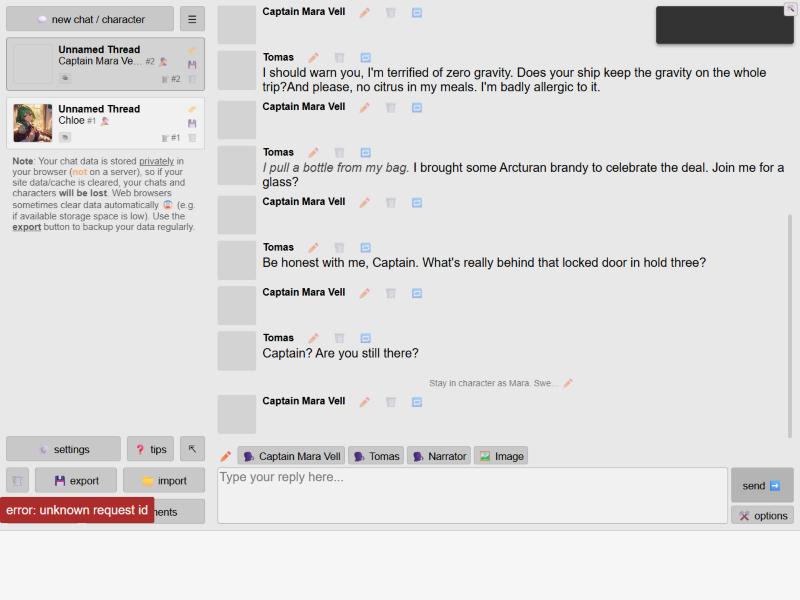
What this does and does not show: it is one session on one afternoon. It shows that the free service can fail; it does not show how often. We will rerun the full script and update this page with the date.
The app’s own tips
Perchance showed us four tips on first use: limit reply length if the character acts for you; edit the AI’s replies early in a chat, because it imitates previous messages; use the reminder message to fix recurring errors; and read the example characters and the tips page for slash commands, group chats and image generation.
Who it suits
- Good for: trying AI roleplay for free, without an account, with more settings than most free apps.
- Watch out for: chats that disappear if your browser data is cleared, and an unreliable free service on the day we tested.
- Content note: the example and community characters are made by users. Keep to adult, original characters, as we do in our rules.
Questions people ask
Do I need an account for Perchance AI Character Chat?
No. We created a character and chatted on 23 November 2026 without signing up or logging in.
Where are my Perchance chats saved?
In your own browser, not on a server, according to the note shown in the app. If you clear your browser data, your chats and characters are lost, so use the Export button to back them up.
Why does Perchance give empty replies?
We saw this ourselves: after a few good replies, several came back empty and the app showed 'error: unknown request id'. We could not find an official explanation. Waiting and retrying later is the only fix we can suggest from one session.